

ADODB in Excel VBA connects a workbook to an external database and runs SQL against it. This page covers the ADODB.Connection reference, connection strings for Excel, Access, SQL Server and MySQL, and working macros for SELECT, INSERT, UPDATE and DELETE.
ADODB.Connection VBA reference
Two objects do the work. ADODB.Connection opens the link to the data source; ADODB.Recordset holds the rows that come back.
Dim conn As ADODB.Connection
Dim rs   As ADODB.Recordset

Set conn = New ADODB.Connection
Set rs   = New ADODB.Recordset

conn.Open connectionString          ' open the data source
rs.Open sqlQuery, conn              ' run the SQL

Sheet2.Range("A2").CopyFromRecordset rs

rs.Close
conn.Close
Set rs = Nothing
Set conn = Nothing
Adding the reference
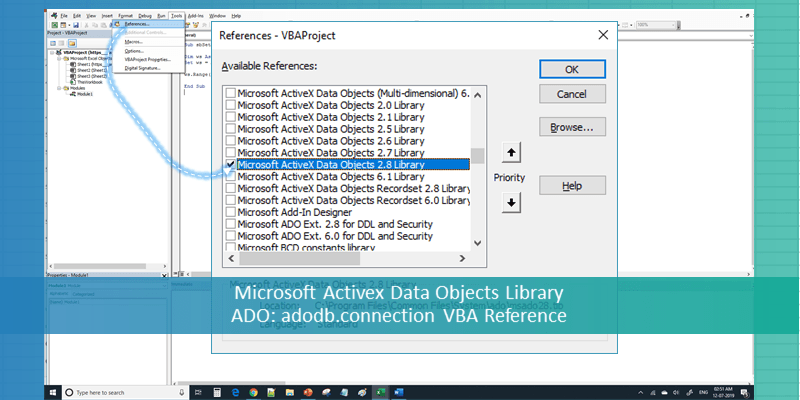
Before any of this compiles you have to add the library. In the VBA editor press Alt + F11, then Tools → References, and tick Microsoft ActiveX Data Objects 6.1 Library. Any 2.x or 6.x version works.
Early binding versus late binding
The code above uses early binding, which needs that reference ticked and gives you IntelliSense. If you distribute the workbook to machines where the reference might be missing, use late binding instead — no reference needed, no IntelliSense:
Set conn = CreateObject("ADODB.Connection")
ADODB connection strings
The connection string is where most of the trouble lives. Pick the row that matches your data source.
| Data source | Connection string |
|---|---|
| Excel .xlsx / .xlsm | Provider=Microsoft.ACE.OLEDB.12.0;Data Source=<path>;Extended Properties="Excel 12.0 Xml;HDR=YES"; |
| Excel .xls (legacy) | Provider=Microsoft.ACE.OLEDB.12.0;Data Source=<path>;Extended Properties="Excel 8.0;HDR=YES"; |
| Access .accdb | Provider=Microsoft.ACE.OLEDB.12.0;Data Source=<path>;Persist Security Info=False; |
| SQL Server | Provider=SQLOLEDB;Data Source=<server>;Initial Catalog=<database>;Integrated Security=SSPI; |
| SQL Server, username | Provider=SQLOLEDB;Data Source=<server>;Initial Catalog=<db>;User ID=<user>;Password=<pwd>; |
| MySQL | Driver={MySQL ODBC 8.0 Driver};Server=<host>;Database=<db>;User=<user>;Password=<pwd>;Option=3; |
Do not use Microsoft.Jet.OLEDB.4.0
Jet is 32-bit only. On 64-bit Office — the default installation since 2019 — it raises “Provider cannot be found. It may not be properly installed.” Use Microsoft.ACE.OLEDB.12.0 instead. It ships with Office 2010 and later, and is available as the free Access Database Engine Redistributable otherwise.
Your provider bitness must match your Office bitness, not your Windows bitness. 64-bit Windows running 32-bit Office needs the 32-bit ACE redistributable.
Complete ADO example: read data into a worksheet
This macro treats the workbook itself as the data source, reads Sheet1 with SQL, and pastes the result into Sheet2. It runs as written.
Sub ADO_ReadFromWorksheet()

    Dim conn      As ADODB.Connection
    Dim rs        As ADODB.Recordset
    Dim dbPath    As String
    Dim sConnect  As String
    Dim sSQL      As String

    On Error GoTo CleanUp

    dbPath = ThisWorkbook.FullName          ' this workbook as the data source
    ' For an external file:
    ' dbPath = "C:\Data\InputData.xlsx"

    sConnect = "Provider=Microsoft.ACE.OLEDB.12.0;" & _
               "Data Source=" & dbPath & ";" & _
               "Extended Properties=""Excel 12.0 Xml;HDR=YES"";"

    sSQL = "SELECT * FROM [Sheet1$]"        ' sheet name plus $, in brackets

    Set conn = New ADODB.Connection
    Set rs   = New ADODB.Recordset

    conn.Open sConnect
    rs.Open sSQL, conn

    If Not rs.EOF Then
        Sheet2.Range("A2").CopyFromRecordset rs
    Else
        MsgBox "The query returned no rows.", vbInformation
    End If

CleanUp:
    If Err.Number <> 0 Then
        MsgBox "Error " & Err.Number & vbCr & Err.Description, vbCritical
    End If

    If Not rs Is Nothing Then
        If rs.State = adStateOpen Then rs.Close
        Set rs = Nothing
    End If

    If Not conn Is Nothing Then
        If conn.State = adStateOpen Then conn.Close
        Set conn = Nothing
    End If

End Sub
Why the cleanup block matters
If the SQL fails halfway, an unclosed connection stays open and the file stays locked — often until Excel is restarted. Routing every exit through one CleanUp label guarantees both objects are closed whether the macro succeeded or not.
Step by step: how the connection works
Four things happen in every ADO macro, in this order.
-
Open the connection to the data sourceBuild the connection string, then
conn.Open sConnect. If this line fails, the problem is the string or the provider — not your SQL. -
Run the SQL command
rs.Open sSQL, connfor a SELECT that returns rows. For INSERT, UPDATE and DELETE useconn.Execute sSQLinstead — there is no recordset to open. -
Copy the recordset into the worksheet
CopyFromRecordsetpastes every row in one operation, which is far faster than looping. It does not bring the column headers — write those yourself. -
Close the recordset and the connectionIn that order, then set both to
Nothing. Leaving a connection open holds a lock on the file.
Sample data
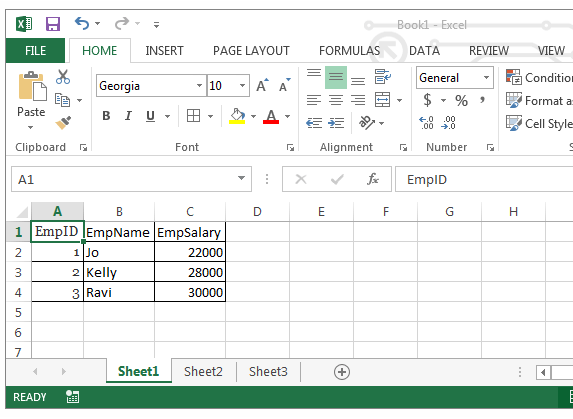
The examples on this page assume Sheet1 holds a table like this, with headers in row 1.
| EmpID | EmpName | EmpSalary |
|---|---|---|
| 1 | Jo | 22000 |
| 2 | Kelly | 28000 |
| 3 | Ravi | 30000 |
SQL commands with ADO in Excel VBA
ADO uses SQL to talk to the data source. Four commands cover almost everything.
| Command | What it does | Run it with |
|---|---|---|
SELECT |
Retrieves rows from the data source | rs.Open sSQL, conn |
INSERT |
Adds new records | conn.Execute sSQL |
UPDATE |
Modifies existing records | conn.Execute sSQL |
DELETE |
Removes records | conn.Execute sSQL |
SELECT with a WHERE clause
sSQL = "SELECT EmpName, EmpSalary FROM [Sheet1$] " & _
       "WHERE EmpSalary > 25000 ORDER BY EmpSalary DESC"

rs.Open sSQL, conn
Sheet2.Range("A2").CopyFromRecordset rs
INSERT, UPDATE and DELETE
These return no rows, so use conn.Execute rather than opening a recordset.
Sub ADO_ModifyData()

    Dim conn As ADODB.Connection
    Set conn = New ADODB.Connection
    conn.Open sConnect

    conn.Execute "INSERT INTO [Sheet1$] (EmpID, EmpName, EmpSalary) " & _
                 "VALUES (4, 'Priya', 35000)"

    conn.Execute "UPDATE [Sheet1$] SET EmpSalary = 32000 WHERE EmpID = 3"

    ' DELETE removes the row contents but leaves the blank row behind
    ' when the data source is an Excel worksheet.
    conn.Execute "DELETE FROM [Sheet1$] WHERE EmpID = 1"

    conn.Close
    Set conn = Nothing

End Sub
DELETE behaves differently against Excel
With a real database, DELETE removes the row. With an Excel worksheet as the data source, it clears the values and leaves an empty row in place. There is no way around this through ADO — remove the blank rows with ordinary VBA afterwards if you need them gone.
Getting the data into an array instead
When you want to process the results rather than paste them, GetRows loads the whole recordset into a two-dimensional array.
Dim dataArray As Variant

rs.Open sSQL, conn
If Not rs.EOF Then dataArray = rs.GetRows   ' dataArray(field, record)
Note the order — GetRows returns fields as the first dimension and records as the second, which is the transpose of what most people expect.
Common ADODB errors and what they mean
| Error | Cause | Fix |
|---|---|---|
-21472178650x80040E37 |
The table or sheet name in your SQL does not exist | Check the spelling and the brackets. An Excel sheet must be written [Sheet1$] — with the dollar sign, inside square brackets. |
-21474672590x80004005 |
Unspecified error. Usually the file is locked, the path is wrong, or the provider is missing | Confirm the file exists and is not open exclusively elsewhere. Check the provider bitness matches Office. |
| Provider cannot be found | Jet.OLEDB.4.0 on 64-bit Office, or ACE not installed | Switch to Microsoft.ACE.OLEDB.12.0 and install the Access Database Engine Redistributable that matches your Office bitness. |
| User-defined type not defined | The ActiveX Data Objects reference is not ticked | Tools → References → Microsoft ActiveX Data Objects 6.1 Library. Or switch to late binding with CreateObject. |
-2147217904 |
No value given for one or more required parameters | A column name in your SQL does not match a header in row 1, usually a typo or a trailing space. |
| Data type mismatch | A column holds mixed text and numbers | Add IMEX=1 to Extended Properties so ADO reads the column as text. |
What is ADO?
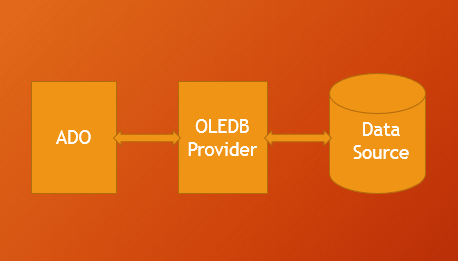
ADO stands for ActiveX Data Objects — Microsoft’s client-server technology for moving data between an application and a data source. ADO does not reach the data source directly; it goes through an OLE DB provider, which is why the provider name is the first thing in every connection string.
Most OLE DB providers are specific to one kind of data source. The exception is the provider for ODBC, which is general purpose — through it, ADO can reach anything that understands ODBC, including MySQL and PostgreSQL.
What is a database?
A database is a collection of information organised so that a program can read and write it reliably. The Database Management System — MySQL, Microsoft SQL Server, Microsoft Access, Oracle, IBM DB2 — is the software that manages it and handles requests from other applications.
Data is normally stored in tables, and a table is a set of records (rows) and fields (columns).
An Excel workbook can act as a data source in exactly this shape: the workbook is the database, each worksheet is a table, and the rows and columns are the records and fields. That is what makes the examples on this page possible without installing anything.
What is SQL?
SQL stands for Structured Query Language. It is the language ADO uses to tell a data source what you want. The four commands in the table above — SELECT, INSERT, UPDATE and DELETE — cover the overwhelming majority of what a VBA macro needs to do.
SQL against an Excel worksheet has some quirks worth knowing: the sheet name needs a dollar sign and square brackets, column names come from row 1 when HDR=YES, and a named range can be queried the same way as a sheet.
Example file
Download the working example to see the connection, the query and the recordset handling in one file.
Related VBA guides
- 100+ Excel VBA macro examples — the full library.
- Excel VBA to interact with other applications — including Access.
- VBA On Error — error handling beyond the CleanUp block above.
- VBA Code Explorer — browse by object, method and property.
- Excel VBA tutorial — from basics to advanced programming.


Nice tutorial- Thanks!
HI,
Nice one.. I am trying to pull multiple values from one parameter in excel, for example. I need to pull the parameter from Range(“a2”) separated by commas,
how can I do this?
Hi Lisa,
Assuming you have data at A1 as “1st,2nd,3rd,4th” and you want to separate it.
You can use Split function to separate the values. Please see the following code.
fullText=Range(“A1″).Value ‘i.e; fullText=”1,2,3,4″
arraySplitValues=Split(fullText,”,”)
Now your array contains the comma delimited values:
arraySplitValues(0) contains 1st
arraySplitValues(1) contains 2nd
arraySplitValues(2) contains 3rd
arraySplitValues(3) contains 4th
You can print the values at any Range like:
Range(“B1”)=arraySplitValues(3)
or you can loop the entire array to print all values:
For iCntr=0 to ubound(arraySplitValues,1)
Cells(iCntr+1,2)=arraySplitValues(iCntr) ‘ this will print all the values in the B Column
Next
Please explain your question in more detailed,so that I can help you in better way.
Thanks-PNRao!
Hi – great article! 2 questions:
1. Do you have to install the ActiveX Object library 2.8 on every machine that uses this Excel file? I ask because I need to set up multiple files for multiple users who could benefit from this functinality (ADODB + SQL queries vs. Linked spreadsheets).
2. Do you know how to create an auto-install program for these MS library features? I ask because I don’t prefer to guide every user through the installation procedure.
Thanks again!
Stephen
Hi Stephen,
Thanks for your comments! Please see my answers below:
1.You do not required to install ActiveX Object library in every machine, by default it is installed when user have installed in MS Office.
2.I think the above information answers this question too…
To help you in understanding clearly: ActiveX Object Library is .DLL file which is installed with your office installation. You need to this reference this in your code, to use the ADO functionality in Excel VBA.
When you successfully write any code using ADO by referring ActiveX Object Library in your workbook. You can send the file to any one, it should work automatically in any system.
Hope this helps.
Thanks-PNRao!
Hi PN,
You are awesome , i love this site.have used your ideas and has helped me a lot. love it..
What i needed to know was that having pulled the record set into sheet :-
1) I want to use the values listed in rows in column A
2) transpose them into a cell and use these values to pull another query record-set with the IN statement.
is there a way to do this in one connection only or open another connection.?
let me know if this is possible.
Regards..
lisa
Hi Lisa,
How are you doing! Thanks for your feedback!
Yes, this can be done. Here is an example case:
To explain this, I have entered some data in ADO sheet of the example file (available at end of the article)
Step1: Entered 1 at Range A2, 2 at Range A3
The I concatenate these values at C1 using the below formul
-> =A2&”,”&A3
i.e; Now you can see ‘1,2’ at C1, I want to pass this in my SQL IN Operator, So – I changed the SQL Query string as follows:
Step2: sSQLSting = “SELECT * From [DataSheet$] where Quarter IN (” & Range(“C1”) & “);”
i.e; it will form the query as ‘SELECT * From [DataSheet$] where Quarter IN (1,2);’
Step3: Now executed and got the required values in the ADO sheet.
Hope this helps!
Thanks-PNRao!
Thanks PN,
This is working nicely. The only thing that I cannot appear to fix is that when one user has the source file open (from which the data comes from) the other user, who is using the destination file (where the data is pulled to), opens a read-only source file when they run the macro. Is there a way round this?
The source file is only supposed to be viewed by one person whereas the destination file is for multiple users
Thanks in advance,
Jon
I used this code to connect to MS Access 2007 database but am getting a runtime error and an application error when I try to open the same. I used DSN as MS Access Database and Provider as Microsoft.ACE.OLEDB.12.0.
Please help.
Hi Subhangi,
Please check if the required OLEDB is installed or not. You can download it the from here: http://www.microsoft.com/en-us/download/details.aspx?id=13255
If you are still facing the issue – try to use the MSDASQL provider.
This is very well explained, if this had been available when I was first learning it would have save me loads of time. Do you have something similar on how to insert into SQL tables from excel?
Hi Noz, Thanks for your comments!
Yes, you can write insert query, you can download the example file and change the query string as follows:
sSQLSting = “INSERT INTO [DataSheet$](Quarter, Sales) Values(2,5000)”
and comment the below line, as insert query will not return any values.
‘ActiveSheet.Range(“A2”).CopyFromRecordset mrs
Now your ADO procedure should look like this:
Sub sbADO()

Dim sSQLQry As String

Dim ReturnArray
Dim Conn As New ADODB.Connection
Dim mrs As New ADODB.Recordset
Dim DBPath As String, sconnect As String
DBPath = ThisWorkbook.FullName
'You can provide the full path of your external file as shown below
'DBPath ="C:InputData.xlsx"
sconnect = "Provider=MSDASQL.1;DSN=Excel Files;DBQ=" & DBPath & ";HDR=Yes';"
Conn.Open sconnect
'sSQLSting = "SELECT * From [DataSheet$]" ' Your SQL Statemnt (Table Name= Sheet Name=[DataSheet$])
sSQLSting = "INSERT INTO [DataSheet$](Quarter, Sales) Values(2,5000)"
mrs.Open sSQLSting, Conn
'=>Load the Data into an array
'ReturnArray = mrs.GetRows
''OR''
'=>Paste the data into a sheet
'ActiveSheet.Range("A2").CopyFromRecordset mrs
'Close Recordset
mrs.Close
'Close Connection
Conn.Close
End Sub
hello, this really helps when you have a simple query.. would you be kind enough to provide an example for a parameter query (multiple) i.e for dates say selct* from table data between fromDate and toDate?
Hi,
Sure, you change the query to suits your requirement.
For example:
I have changed the query sting from sSQLSting = “SELECT * From [DataSheet$]” to sSQLSting = “SELECT * From [DataSheet$] Where Quarter Between 2 And 4” in the example file. And now it will pull the data if the quarter is between 2 and 4.
For your requirement, sSQLSting will be something like below:
sSQLSting = “SELECT * From [DataSheet$] Where YOUR_Date_Varibale Between ‘LowerDate’ And ‘UpperDate'”
If Dates creates any problems, try to use date values.
Hope this helps-Thanks-PNRao!
Hi Sir,
that works but I am having issue with the parameters dates as my query below
“O.DELIVERY_DATE BETWEEN :”From date” AND :”To Date” ) . how do i setup the parameters in vba to ensure that the record-set only pulls data in ‘DD-MMM-YYYY’ format. right now i have the dates converted to text(“dd-mmm-yyyy”) but when the data is returned its shows up in ‘mm/ddd/yyyy’ .
note :i have the user to input the dates..
Hi,
You can create the query string use as shown below:
FromDate = 1 / 1 / 2010
ToDate = 12 / 30 / 2012
sSQLSting = “SELECT * From [DataSheet$] Where O.DELIVERY_DATE Between ” & FromDate & ” And ” & ToDate
And your excel, default date format is ‘mm/ddd/yyyy’, you can format the dates using either sql or VBA.
In VBA it is like this: Format(YourDate,”mm-dd-yyyy”)
Thanks-PNRao!
Hi Sir,
my code is
userInput (“Pls type FromDate”) ,FromDate
userInput (“Pls type ToDate”) ,ToDate
FromDate = format(FromDate,”dd-mmm-yyyy”)
ToDate = format(ToDate,”dd-mmm-yyyy”)
“select…
…..”AND O276054.DELIVERY_DATE BETWEEN ” & FromDate & ” And ” & ToDate & _ ”
i tried that but i keep getting error ‘saying missing expression..’
what am i doing wrong??
Hi,
I could not find any issue in the code. As per the Error message, something wrong with the query string. Could you please provide me the complete query string.
Or you can try this: You can use Debug.Print YourstrQery, now look into the Immediate Window to see the resulted query.
You can send me the file with some dummy data to our email id: info@analysistabs.com
Thanks-PNRao!
Hello, very good site .. quick question do you have an example for record-sets and Pivot tables or cross-tabs.?
i have an issue which I am trying to merge two query’s into one record-set and Pivot them into a cross report?
something similar to what Discoverer does. but I am trying to combine aggregate data points with Detail data points into one sheet without errors..(that’s why the two query s)
please direct in a right direction if this is doable???
Hi Nigel,
Please look into the example below:
'Add reference for Microsoft Activex Data Objects Library
Sub sbADO()
Dim sSQLQry As String
Dim ReturnArray
Dim Conn As New ADODB.Connection
Dim mrs As New ADODB.Recordset
Dim DBPath As String, sconnect As String
DBPath = ThisWorkbook.FullName
'You can provide the full path of your external file as shown below
'DBPath ="C:InputData.xlsx"
sconnect = "Provider=MSDASQL.1;DSN=Excel Files;DBQ=" & DBPath & ";HDR=Yes';"
Conn.Open sconnect
sSQLSting = "SELECT * From [DataSheet$]"
'***********> You can change this query as per your requirement (Join / Union)
mrs.Open sSQLSting, Conn
'Set record set as a pivot table data source
Set objPivotCache = ActiveWorkbook.PivotCaches.Add( _
SourceType:=xlExternal)
Set objPivotCache.Recordset = mrs
With objPivotCache
.CreatePivotTable TableDestination:=Range("G20"), _
TableName:="MyPivotTable1"
End With
'Close Recordset
mrs.Close
'Close Connection
Conn.Close
End Sub
Hope this helps! Thanks-PNRao!
Hi,
I would like to automate my daily process by using VBA and macro actually my doubt is there any solution for instead of copying and pasting the query statement to SSMS 2005 which is stored in excel.So by making that statements as link or by clicking some command buttons to pass that query to SSMS and thus the statement should be executed automatically by using ODBC conn or OLEDB data sources. Is it Possible ???
Hi Gavrav,
Yes – we can do this. You can simply record a macro and fetch the data using tools in Data menu tab.
Thanks-PNRao!
Hi All,
I am very glad that I visited this website and would like thank you for giving such valuable info.
I have one question in VBA while using ADO and database as excel how we can use where condition and other query on excel sheet like below example of this website.
sconnect = “Provider=MSDASQL.1;DSN=Excel Files;DBQ=” & DBPath & “;HDR=Yes’;”
Conn.Open sconnect
sSQLSting = “SELECT * From [DataSheet$] WHERE ” ‘ Your SQL Statemnt (Table Name= Sheet Name=[DataSheet$])
mrs.Open sSQLSting, Conn
‘=>Load the Data into an array
‘ReturnArray = mrs.GetRows
”OR”
‘=>Paste the data into a sheet
ActiveSheet.Range(“A2”).CopyFromRecordset mrs
‘Close Recordset
mrs.Close
Here is only select condition used. Please help me how we can use different SQL condition.
Another question how we can connect to MYsql database using VBA?
Please help me in the above questions and thanks a ton in advannce.
Regards,
Ricky
Hi Ricky,
Thanks for your comments.
Please check the codes provided in the comments section, I have given the example queries which you have mentioned.
And regarding MySQL, you can use the following connection string:
sconnect = “DRIVER={MySQL ODBC 5.1 Driver};” & _ “SERVER=[Server];” & _ “DATABASE=[Database];” & _ “USER=[UserName];” & _ “PASSWORD=[Password];” & _ “Option=3”
And replace [Server], [Database], [UserName] and [Password] with the respective original server name, database, User and Password.
If your system is not insstalled MySQL, then you have to download and install MYSQL ODBC Driver: http://dev.mysql.com/downloads/connector/odbc/5.1.html
Hope this helps!
Thanks-PNRao!
Hi Pn,
Thanks your previous example works perfectly. would you be able to help with multiple record sets. I need to add the second query record-set in between the data of the first record set after exporting to sheet.
Hi PN, sorry hope if didn’t confuse you with my inquiry.. I will provide an example
I need to combine two record sets as I cannot put them in one query due to the data constraints.
query1= “select Total_DLV , AVAIL_DLV between date1 and date2 from Table1″ into Sheet1
query2=”select Sch_DLV , between date1 and date2 from Table2” into Sheet1
combine data from the two querys into sheet1 like
DLV_date—>aug1, Aug 2 ,aug3 (horizontal)
Total_DLV , ..
AVAIL_DLV
Sch_DLV
please let me know if this is possible..
Hi
Nice explanation!
Question: how can i get the data from different ‘sourcerange’ from within one sheet i.e multiple columns?
code:
SourceRange = “C1:C6500 ,D1:D6500 ,AB1:AB6500,AG1:AG6500”
szSQL = “SELECT * FROM [” & SourceSheet$ & “$” & SourceRange$ & “];”
Hi PN ,
i fixed the issue.,, this was more to do with my query itself. i managed to fix this within the first query itself. no need for multiple queries.
however please provide an example for multiple record-sets if possible..
Hello Team,
I have a sheet with thousand records and I want filter recordes based on Activsheet name
Query is working fine when I am putting directly the value in condition like below
sSQLSting = “SELECT * From [Data$] where Country =’India’; ”
But I want to filter it based on Acrive sheet name.
I tried two methods but it is prompting same Run time error.
s = ActiveSheet.Name
sSQLSting = “SELECT * From [Data$] where Country =s ”
sSQLSting = “SELECT * From [Data$] where Country =Activeshet.name ”
sSQLSting = “SELECT * From [Data$] where Country =’Activeshet.name’ ”
Please cound you advise me how I can do this..
Hi Amir,
You can mention the column names, instead of specifying multiple ranges, for example:
szSQL = “SELECT Column1, Column2 FROM [Sheet1$]”
Thanks-PNRao!
Hi Ricky,
Please change your code like this:
s = ActiveSheet.Name
sSQLSting = “SELECT * From [Data$] where Country = ‘” & s & “‘”
Thanks-PNRao!
I see you share interesting content here, you can earn some additional
cash, your blog has huge potential, for the
monetizing method, just search in google – K2 advices
how to monetize a website
is there a way to send parameters(through InputBox/MsgBox) using Select statement and extracting user specific data into excel using ADO.
Thanks for all your help and support.
Yogesh
Dear Pn rao,
Please let me know if you are pulling data from excel , is this code using sql while retrieving data ? because this is not connecting to server. waiting for your response. thanks in advance.
MAndeep
Explain me this line of code please ” sconnect = “Provider=MSDASQL.1;DSN=Excel Files;DBQ=” & DBPath & “;HDR=Yes’;”
Hi Mandeep,
We need to create a connection string to connect any data base using VBA.
sconnect = “Provider=MSDASQL.1;DSN=Excel Files;DBQ=” & DBPath & “;HDR=Yes’;”
Provider=MSDASQL.1 : This is OLEDB Provider, this helps excel to understand the data base query syntax.
DSN=Excel Files : Data Source Name, Excel Files is data source in the given example.
DBQ= &DBPath : Data base file path, this is the full path of Excel File to connect.
HDR=Yes’: Headers, Yes – if the first line of your data (in sheet or range) having headers, other wise No.
Hope this helps!
Thanks-PNRao!
Hi Mandeep,
Yes, we are pulling the data from Excel using ADO. You need to change the connection string if you are connecting any other DB.
Thanks-PNRao!
Hi Yogesh,
Yes, you can use Inputbox to enter some parameters and change the query accordingly.
Example:
x = InputBox(“Please enter field to select”, “Please Enter”)
‘You cna change the below query
‘sSQLSting = “SELECT * From [Sheet1$]
‘As shown below:
sSQLSting = “SELECT ” & x & ” From [Sheet1$]”
‘Your remaing code here, similarly you can keep a WHERE Condition—
Thanks-PNRao!
Hi PN,
I am trying to copy the data from one workbook to another. Everything goes fine till the fetching of data from the source workbook but when I tried to paste the data in the destination workbook I am getting the following error:
Run-time error ‘-2147467259 (80004005)’:
You cannont move a part of a PivotTable report, or insert worksheet
cells, rows, or columns inside a PivotTable report. To insert worksheet
cells, rows, or columns, first move the PivotTable report (with the
PivotTable report selected, on the Options tab, in the Actions group,
click Move PivotTable). To add, move, or remove cells within the
report, do one of the following:
Code used is:
Dim DNameRecvd
Dim query As String
Dim ReturnArray
DNameRecvd = DName
Dim conn As New ADODB.Connection
Dim mrs As New ADODB.Recordset
Dim DBPath As String, sconnect As String
DBPath = ThisWorkbook.FullName
sconnect = “Provider=MSDASQL.1;DSN=Excel Files;DBQ=” & DBPath & “;HDR=Yes’;”
conn.Open sconnect
query = “SELECT * from [Data$]”
mrs.Open query, conn
Workbooks(“DestinationFile”).Activate
Sheets(“Sheet4”).Activate
Sheet4.Range(“A2”).CopyFromRecordset mrs ‘—-Receiving error message at this line
mrs.Close
ActiveWorkbook.Save
MsgBox (“Done”)
Please help. Thanks in Advance.
Dear Pn Rao
i have to go through entire spreadsheet/workbook to find current status of articles by adding received date to 20 and if it matches today’s date. change the color of that row. can i do it without ADO connection
Hi Gayathri,
Yes, we can open the workbook and do whatever we want without using VBA. Your code will be some thing like this:
You can open the required file:
set Wb=Workbooks.Open(“C:\tempworkbook.xlsx”)
Assuming you have recieved date in Column A
iCntr=1
Do while Wb.Sheets(“SheetName”).Cells(iCntr,1)<>”
If Format(Wb.Sheets(“SheetName”).Cells(iCntr,1),”DD-MM-YYYY”)=Format(Now(),”DD-MM-YYYY”) then
‘Here you can change the cell/range color
End If
Loop
Hope this helps!
Thanks-PNRao!
thanks a lot.. :)but where to put this code. either by keeping a button or create a macro module for this workbook. My requirement is Say if the article is received on september 10 i have to get that row say in green color on september 30
Mr.Rao thanks for your timely help:) :) Customized ur code and it works well..
You are most welcome!
Thanks-PNRao!
Dear PnRao
I am using this code to connect to MS Access 2013 and used your previous comment to Shubhangi to structure the code. Everything seems to be working fine until I get to this part of the code:
sSQLSting = “SELECT * FROM [BD_X]” where BD_X is the name of my Access table
Here I keep getting an Error. I all ready have the required OLEDB and also tried using this code instead:
sSQLSting = “SELECT * FROM [BD_X$]”
I would appreciate some help.
Hi,
You can use the table name directly: sSQLSting = “SELECT * FROM BD_X”.
If you want to refer Excel sheet as table then it will be like [BD_X$], if you connect any data base like MS Access, MS SQL Server, Oracle or Teradata you can use the table name.
Hope this helps!
Thanks-PNRao!
Greetings PNRao,
I am in between developing a small project for the place I work at.
Currently I am helping out the call center gang with automating their reports.
There is a huge report that they spool off a web site at the end of each month…
They obtain it in the form of an excel file with 97 format, which means each sheet is limited to 65535 rows only.
So therefore the report spans to 4 sheets and could be more…
I have completely automated this report into various pivot format for them per their requirement using Excel VBA.
However the code is slow to about 10 seconds.
There are many data analysis involved like filtering out the blanks off 2 columns, unwanted rows from another and pivoting them to obtain 4 reports using different criteria each.
I am talking about 260000+ records analyzed to about 72000+ actual meaningful data for the report.
Now, I thought maybe ADO could work out the trick more efficiently and faster.
I have worked with ADO before in access/excel and know how to on the basics of connection etc.
Currently, I need to know 2 things at this point:
1) Is the ADO method faster than using excel automation via variant and/or range methods combined with loops?
2) How do I append data from 4 sheets into 1 recordset to later analyze it with various select statements? Do I have to use an append query to obtain data from each sheets? If so, let me know how the query would look.
Note: What I am thinking of doing is to completely do the required data manipulations within ADODB recordset and insert the manipulated data into a new sheet in Excel 8 format. Also, to run queries and to obtain the reports required from these manipulated data and again insert sheets into excel form query object.
Could you kindly guide me into the various steps I need to be looking at to achieve these goals.
Thanks in advance,
Philip
Hi PN ,
This is really helpful .
One thing that is not working at my end is changing HDR=No’; … this code is not giving me the header which is required.
I tried with for loop which is working in that case , just wanted to know if how would HDR would work.
Thank you
Hi PN,
This code is working fine , but I am not able to get the header eve after making HDR =No .
Could you please help me on this .
Thanks ,
Suruchi
Hi Philip,
PivotTable is better than ADO, if your customers use Excel 2010 or higher. And to combine the Data into one record set, you query all data into one record set using UNIONs.
Hope this helps.
Thanks-PNRao!
Hi Suruchi,
The usage of HDR is to tell the ADO whether your data has headers or not.
HDR= Yes means: You have the data and the first row is having headers and data starts from the next row.
HDR= No means: Your data has no header row and and data the data starts from the first row.
Hope this clarifies your query.
Thanks-PNRao!
Hi PNRao,
This is a great & Nice Information!
Would you be kind enough to answer the following question too,
Question: how can i get the data from Oracle Database, currently I use SQL Developer to query and store the result in excel and process it later, but since the number of individual sqls increased i’m looking for something like this and if you can help me in this regard, it would be great.
Thanks in advance
Mani
Hi,
i would like to connect to PL/SQL developer from MS Excel and fetch the records from it and copy to the excel sheet. The query i want to execute is ‘SELECT * FROM TABLE_NAME’. Please let me know the connection string to use.
Thanks in Advance.
Hi PN,
I am trying to pull data from SQL Server 2012 using excel VBA Code but it is showing that SQL Sever is not exit or access is denied. Please let me know how to do so. It will be a great help.
Thanks in Advance.
Is it possible to join 2 tables from separate databases in an SQL query within Excel VBA?
I am currently extracting data from a table in a Firebird database but need to access data from records form a table in another Firebird database. The results of the query are used as input to a case statement that totals and dumps data into a worksheet.
I can do this in Access since I link to the tables as required, can I have 2 connections open at once in Excel?
Amazing Website…………..Thank you for giving me proper information.
With help of this website, i have entered the insert query & it is properly working but on this “mrs.Open sSQLSting, Conn” statement getting errors ‘Run-Time Error 3704’. Please help on this..I appreciated.
Record is properly inserted into SQL database but getting above error message. please check…
Sub sbADO()
Dim sSQLQry As String
Dim ReturnArray
Dim Conn As New ADODB.Connection
Dim mrs As New ADODB.Recordset
Dim DBPath As String, sconnect As String
sconnect = “Provider=SQLOLEDB.1;Data Source=******;Initial Catalog=******;User ID=*******;Password=*****;”
Conn.Open sconnect
sSQLSting = “INSERT INTO [tablename](code, fname,lname,process) Values(‘20202020′,’Prasad’,’Sakpal’,’PC001′)”
mrs.Open sSQLSting, Conn ‘ Getting error message on this line, but record is properly inserted in to SQL database.
mrs.Close
Conn.Close
End Sub
Error is = ‘Run-Time Error 3704′
Application Defined or Object Defined Error
Hi,
I have a query. While uploading data to SQL, if i try to download data from SQL using excal vba it is failing and throwing error.Do we have any wayt to handle mulitple calls in SQL using VBA….
An really confused shud it be done at vba end or SQL end?
This thread has been very helpful in getting going. However, there is one problem. I am using an ODBC driver talking to Google big query but I imagine this problem I have could be relevant to any DBMS connection that has it’s own SQL variant. The key requirement for me is to be able to pass the NATIVE SQL code that the DBMS supports rather than being forced into submitting ANSI SQL which very limiting. I’m using a driver that is meant to supports both.
The following works as intended:
Dim Conn As New ADODB.Connection
Dim mrs As New ADODB.Recordset
Conn.Open “DSN=bq”
SQLString = “SELECT count(*) as a from EVENTS.Game_20141205 ”
mrs.Open SQLString, Conn
Sheet2.Range(“A2”).CopyFromRecordset mrs
mrs.Close
Conn.Close
But if I try and submit any non-ANSI SQL statement for example:
SQLString = “select a from (SELECT count(*) as a from EVENTS.Game_20141205) ”
(and this SQL runs perfectly well if you send it directly to Google bigquery directly from the google webconsole)
The driver pops an error:
Run-time error ‘-2147217911 (80040e09)’:
[Simba][SQLEngine] (31480) syntax error near ‘select a from (SELECT count(*) as a from EVENTS.Game_20141205) <<>>
which I assume is because it’s not ANSI form SQL. Does anyone know how to submit the native SQL through vba (which should directly be passed through to the DBMS without any checking)
In the file “remedy-export” there are no header and 5 rows of data
When I run the code, it only assigns data from row 2 to row 5 to the array. What am I doing wrong?
[code]
Sub Connect_to_Sheet()
Dim SQLString As String
Dim ReturnArray
Dim Conn As New ADODB.Connection
Dim rsRecordset As New ADODB.Recordset
Dim DBPath As String, sConnect As String
Dim Col_Idx, Row_Idx As Long
DBPath = ThisWorkbook.Path & “remedy-export.xlsx”
sConnect = “Provider=MSDASQL.1;DSN=Excel Files;DBQ=” & DBPath & “;HDR=NO’;”
Conn.Open sConnect
SQLString = “SELECT * From [Ark2$]”
rsRecordset.Open SQLString, Conn, adOpenStatic, adLockReadOnly
Row_Idx = rsRecordset.RecordCount
ReturnArray = rsRecordset.GetRows
rsRecordset.Close
Conn.Close
End Sub
[end code]
Hi All,
i want to copy only specific cells range.
KINDLY HELP ME.
hi pn
i am trying to connect ms access 2010 data base but its showing erroe
provider not recognized can to help me for over comming from this problem
thanks
kesav
Ho to delete table in existing access database? by using
Hi Baha,
You can delete the table using TRUNCATE or Drop statement if have full permissions.
To delete only the data: TRUNCATE TABLE table_name;
Warning: If you use the below statement, you will loss the entire table and you can not roll back.
To delete entire data: DROP TABLE table_name;
Thanks-PNRao!
Hi,
I need VBA & SQL learning material because i don’t have knowledge in VBA but i have knowledge in MS Office(Advance excel..).
Any one please send to my email.
I was creating a macro to remove exact row duplicate in excel using sql query,but it it giving me “Runtime error -2147217865(80040e37)”. Below isthe VBA code
Sub sbADOExample()
Dim sSQLQry As String
Dim ReturnArray
Dim Conn As New ADODB.Connection
Dim mrs As New ADODB.Recordset
Dim DBPath As String, sconnect As String
DBPath = ThisWorkbook.FullName
‘You can provide the full path of your external file as shown below
‘DBPath =”E:tempInputData.xlsx”
sconnect = “Provider=MSDASQL.1;DSN=Excel Files;DBQ=” & DBPath & “;HDR=Yes’;”
Conn.Open sconnect
sSQLSting = “select distinct column1, count(*) From [Sheet1$] group by column1 having count(*) >1″
‘ Your SQL Statement (Table Name= Sheet Name=[Sheet1$])
mrs.Open sSQLSting, Conn
‘=>Load the Data into an array
‘ReturnArray = mrs.GetRows
”OR”
‘=>Paste the data into a sheet
Sheet2.Range(“A2”).CopyFromRecordset mrs
‘Close Recordset
mrs.Close
‘Close Connection
Conn.Close
End Sub
Note : Above code working perfectly fine for 2 column
Hi Sachin,
I found no issues in your code. Please send your file with some dummy data. So that we can help you to solve your issue.
Thanks-PNRao!
Hi PN Rao – Thanks for the post really helpful
I am trying to use Sum( Case when ( condition) then 1 else 0 end ) in this concept and it keeps saying automation error
The same code is working perfectly in SQL server
Please advise
Thanks
Manoj
Hi Rao
I am also getting the same kind of error as Sachin is geeting
I am getting the error in this line “mrs.Open sSQLsting,conn”
error is “Runtime error -2147217865(80040e37)”
Hi Richard and Sachin,
Please make sure that the field names are correct. I could not find any issue in the Sachin’s query.
Thanks-PNRao!
Dear analists
the code is working but I am retrieving in Sheets(1) just 54’816 lines on 575’000 present in Sheets(2).
do you know why?
I am using Excel 2010
Thanks
Enrico
Hi PN ,
Read through the post great information you are sharing indeed.. I have a scenario where i would need to pull the values in a column in sheet say Sheet1 whose range may be dynamically changing into IN clause in SQL server query with values like ‘A’,’B’,’C’ etc
Hi experts..
How about Dbf files?what string/connection code?
Thanks
Really great. I could get what I could not even in Microsoft site
Hi,
I want to access the info of memory usage of production database in my excel sheet.
can anyone help me with vba.
Hi,
I want to get a notification automatically when a file is copied in a folder. Can this be done by VBA macro ?
Please help me.
Thanks,
Sheriff
Please reply for the above query to this email beckhamsherieff@gmail.com
Hi,
Thanks for sharing this info…
Very useful
regards
sam
Thanks for the code. It works with the user input when input command is used. But, it does not work when the user enters a value in the textfield in the userform created in excel VBA. Why does this happen? It just does not work with the userform text field input. Any help is appreciated. Here is the code:
Sub UForm()
Dim sSQLSting As String
Dim ReturnArray
Dim Conn As New ADODB.Connection
Dim mrs As New ADODB.Recordset
Dim DBPath As String, sconnect As String
DBPath = ThisWorkbook.FullName
sconnect = “Provider=MSDASQL.1;DSN=Excel Files;DBQ=” & DBPath & “;HDR=Yes’;”
Conn.Open sconnect
sSQLSting = “SELECT * From [Sheet1$] where Order_Number = ” & ordernotext1 ‘ Your SQL Statement (Table Name= Sheet Name=[Sheet1$])
mrs.Open sSQLSting, Conn
Sheets(“ReportsO”).Range(“A8”).CopyFromRecordset mrs
mrs.Close
Conn.Close
End Sub
Hi ,
I am able to execute query from VBA on my DB2. But sometime I need to abort query because of DB conjunction. Please suggest me way to abort query , if executed through VBA.
Thanks in advance.
Regards,
Kishan Sanghani
Hi,
Am able to connect to excel data source using ADO connection. But my excel has 265000 rows and 118 columns. When I try to open record set, it struck and it taking more time.. Is that any way to use Ado connection and open record set in quick turnaround? Pls suggest.. Tnx
Nice Explanation…..Thanks.
If I want to save picture of employees in (the respective rows) a column. for example Emp_Photo
and if I run Select * from [Sheet1$] it is bringing all information but not the pictures
How to achieve it?
Try to connect in a blank New workbook and after connection is established then copy the original sheet into this new workseets.
Hi,
The code you gave worked! I am really kinda new to this old VBA stuff. My problem is it opens on a new sheet in a new workbook. How can I have the data displayed on an existing sheet with existing columns?
Thank you in advance for your help PN.
– V
Hi PN – Your site has awesome content and I am hoping you can resolve my query.
I have a MySQL database and I have connect it to excel using VBA on the local machine. Now I want to give the same excel file as an input/output mechanism to all the users to interact with the database installed on my computer. All the users are in a network. Any help would be greatly appreciated.
Hi Sameer,
Thanks for your feedback!
Here are the possible solutions and my preference order:
Solution 1: You can create new database in any server and export the local database into server and change the connection string. All your user need to have MySQL OLEDB Provider in their PCs.
Solution 2. You can export to MS Access database and change the connection string. For this your user do not required to install any additional Provider.
Hope this helps!
Thanks-PNRao!
StrSQL=”SELECT * FROM [Shee1$] MINUS SELECT * FROM [Sheet2$] is not getting executed.
Help required.
Hi PNRao,
I would query to the first worksheet of selected workbook through navigate to the workbook location and user select it( I used worksheets(1) but can not successful), can you show me a sample how to assign this parameter of worksheets(1) to the vba query?
Regards/Dung
This paragraph ցives ϲlear idea in support οf the new users.
Hi
Am trying to run sql Analysis query in excel macro . Can you please help me .
Thanks in advance
Hi,
Very helpful page, thank you.
I have managed to use a select query to retreive data from a second sheet however I am wanting to update data in a sheet using this method. I have changed the sSQLSting to an update query which appears to run but the data does not update.
Could I please trouble you for a simple example of how to update a cell value?
Column A (Dealer) is unique and Column B (Value) is the cell that I am trying to update
Sheet name = DATA
Column A = Dealer
Column B = Value
Thank you,
Dan
Sorry for wasting your time with my first message, was a pretty simple mistake in the end.
I have it working however I am wanting to source the value that I am updating from a cell on the sheet. I have done this with:
Dim NewVal As String
NewVal = Sheets(“ADO”).Range(“N2”).Value
When I try to put this into the sSQLSting it errors. Can you please help me out.
Thanks again.
Code:
‘Add reference for Microsoft Activex Data Objects Library
Sub sbADOUPDATE()
Dim sSQLQry As String
Dim sSQLQry2 As String
Dim NewVal As String
Dim ReturnArray
Dim Conn As New ADODB.Connection
Dim mrs As New ADODB.Recordset
Dim DBPath As String, sconnect As String
DBPath = “P:DocumentsSALESOrderwrite2015TestingBook2.xlsx”
NewVal = Sheets(“ADO”).Range(“N2″).Value
‘You can provide the full path of your external file as shown below
‘DBPath =”C:InputData.xlsx”
sconnect = “Provider=MSDASQL.1;DSN=Excel Files;DBQ=” & DBPath & “;HDR=Yes’;”
Conn.Open sconnect
sSQLSting = “UPDATE [Data$] SET Content = ‘testing2’ WHERE Dealer = ‘Q325′”
mrs.Open sSQLSting, Conn
sSQLSting2 = “UPDATE [Data$] SET Content = 1000 WHERE Dealer = ‘Q375′”
mrs.Open sSQLSting2, Conn
‘Close Connection
Conn.Close
End Sub
Question: I have a header where it has been merge with under a 3 column, is it possible to call the sub column? Thanks!
Hi All
I have a spreadsheet with an Excel Table named Table1 with two Columns named Quarter and Sales.
The Table has say 4 rows of data beneath the header. Then there is more data in the rows below the table which is not part of the table.
How do I copy only the data in the Table rows?
Using SqlQry = “SELECT [Quarter], [Sales] FROM [Sheet2$][Table1$]”
Copied all the data in the two columns including the data outside the Table.
Thanks.
Hello,
I am trying to set up a connection to MySQL and came across this example. I applied the code to my own file. But what i can not seem to figure out is why the file does not take the values you write in A1, A2 etc. where in the code do you tell the code to skip the first line?
This is precisely what i was searching for..Thanks a Ton.
One question please….Here we saw fetching data from a spreadsheet using ADO.
Can we write data from a User interface,like a form (in Spreadsheet A) to a Database (Spreadsheet B) using ADO ?
Please can you point me to where can I get more info on this.
All the best with your efforts. God bless !
Hello,
I have made a connection with a dbf file with VBA this works great, but is it also possible to open multiple dbf files en join them in the SQL? Iám trying hard but can’t figure it out.
Hi,
I want to fetch records from a database. How to do that? I have read only access to that database.
hi friends,
i want a code to update a table in a database. when we click command button in vba?
anyone can help me
hi, i couldn’t download the example file, seems the linkage was corrupted.
HI ,
Really helpful blog, I am encountering an error when I tried to use Like operator in my sql statement.
exs
Dim sSQLQry As String
Dim ReturnArray
Dim Conn As New ADODB.Connection
Dim mrs As New ADODB.Recordset
Dim DBPath As String, sconnect As String
DBPath = ThisWorkbook.FullName
‘You can provide the full path of your external file as shown below
‘DBPath =”C:InputData.xlsx”
sconnect = “Provider=MSDASQL.1;DSN=Excel Files;DBQ=” & DBPath & “;HDR=Yes’;”
Conn.Open sconnect
Debug.Print YourstrQery,
1. SQLSting = “SELECT * From [Sheet1$] WHERE [URL] like ‘%POST /login.form HTTP/1.1%’ ”
2. SQLSting = “SELECT * From [Sheet1$] WHERE session in(Select Distinct session from [Sheet1$]) and [URL] like ‘%POST /login.form HTTP/1.1%’ ”
mrs.Open sSQLSting, Conn
There are records in the sheet titled ‘Table2’, which have Cust_ID not present in column Cust_ID in the sheet titled ‘Table1’ (e.g. 110, 117). Can you write an Excel VBA program that transfers the data in these sheets to 2 separate tables in Access DB, runs the appropriate query and provides the list of unmatched records from ‘Table2’? Please use ADO method for database connectivity. The program should execute on clicking a button in Excel and output should comprise of unmatched records displayed in a new Excel sheet.
I did’nt find the example file =(
Can you send me the link?
Thanks- We have fixed the download link.
Thanks-PNRao!
Dear All,
Any one can help me with using variables in update command? in the above example, update is used only with exact number which will not be the case for real time situation. We need a variable that takes values from the user form.
Thanks,
Kamal Kroor
Damn… I’ve been trying so hard to learn this, but nothing ever seems to work.
I finally downloaded the example file and not even that is working. I get the message, “System error &H8000FFFF (-2147418113). Catastrophic Failure.”
I activated the 2.8 library something, so I dont know what could be going wrong.
Also, every source I look for to study gives me a completely different macro example, so I can’t even compare them to better understand the coding.
When I do find good content to learn SQL from, it doesnt seem to be related to excel vba, so it doesnt help me all that much.
I’m trying to learn how to filter data with ADO insteand of using autofilter. At first I saw someone posting this example:
Sub testConnection()
Dim wb As Workbook
Dim c As WorkbookConnection
Dim sql As String
Set wb = ActiveWorkbook
Set c = wb.Connections.Item(1)
sql = c.ODBCConnection.CommandText
sql = Replace(sql, “WHERE (`’Sheet1$’`.k=10)”, _
“WHERE (`’Sheet1$’`.k=9) AND (`’Sheet1$’`.l=11) AND (`’Sheet1$’`.m=12) AND (`’Sheet1$’`.n=13) “)
c.ODBCConnection.CommandText = sql
c.Refresh
End Sub
can anyone make sense of this?
Hi
Could you let me know if we can connect a macro to the server and get the information from the log files.
And if yes , then could you let me know how we could connect to the server.
Hi PNRao,
Your website is awesome!
Do you have experience to use RANK() OVER(PARTITION BY) function by ADODB connection?
I need to rank first and output them.
Any help would be greatly appreciated.
Stanley
HI PNRao,
New to using VBA & ADO , I wish to use a similar code that uses an input-box to pull through the relevant input from a closed workbook to my current active workbook, is this possible?
Kind Regards,
Stewart
Thanks!! for the valuable information!!
Very nice Article. I have one query in this that I have one column which has number as well as text and I found one thing that vb query that declare the fields type as Number and it will not show Text values. So is it possible to import all the fields with data type as a string because string can capture both number as well as text.
Hi, I am new to VBA and application development. Please how can someone start with learning VBA and Database Application development? Thank you
WOW, This is what am searching for entire day, and this post Cleared My doubts and issues. Thx a lot
Hello sir,
While I run my code it is showing automation error. Can you please etell me why is it so occuring.. tell me the solutio n for the same.
Hi,
when the Excel file is opened read-only, the sql query (with both providers MSDASQL and Microsoft.Jet.OLEDB) does not return any results.
Any ideas how to overcome this, maybe using additional parameters?
Hi PNRao,
Information provided by you in your website is excellent.
I customised this code to postgresql,but getting an Run-Time error object required: 424.Can you please help me with this error.
Thanks
Rakesh
Dear PN,
Really, this webpage is very useful, thanks for your efforts.
I have one question here:
Instead of figures (2 & 5000) at ‘Values(2,500)’ how can use variables or cells from active sheet?
Thanks in advance & regards,
AK
You need to form the string as per your requirement.
Replace the below statement:
sSQLSting = “INSERT INTO [DataSheet$](Quarter, Sales) Values(2,5000)”.

With:

sSQLSting = “INSERT INTO [DataSheet$](Quarter, Sales) Values(" &Range("A1") &"," &Range("A2") &")”.
The second statement will read the values from Range A1 and A2 of ActiveSheet. You can also specify the sheet name if it is not a active sheet, Sheets(“SheetName”).Range(“A1”)
Thanks!
That’s really awesome. Thank you very much
How to update closed workbook using ADO?
How do I use where statement and group by??
Hi recordset stores the result in array form, when using select a view/output is getting stored.but using insert there is no output, it will process the query and store data in mentioned table.
Add one more line, select * from [inserted_table]
Before msr.
Hope you get the logic.
Thanks
Hi Sir,
I have insert code but show the error.
Option Explicit
Dim BlnVal As Boolean
Private Sub Done_Click()
Dim sSQLQry As String
Dim ReturnArray
Dim con As ADODB.Connection
Dim sqlstr As String, datasource As String
Set con = New ADODB.Connection
datasource = “D:TEST.xlsx” ‘change to suit
Dim sconnect As String
sconnect = “Provider=Microsoft.ACE.OLEDB.12.0;” & _
“Data Source=” & datasource & “;” & _
“Extended Properties=”Excel 12.0;HDR=YES”;”
With con
.Open sconnect
‘
sqlstr = “Insert Into [Sheet2$](Sno, Name, Amt) Values (GP.ComboBox1.Value, GP.TextBox1, GP.TextBox2)”
‘
.Execute sqlstr
.Close
End With
Set con = Nothing
End Sub
I have insert data in offline Excel File & Same Update Data Combobox1 and TextBox1 only Number accept. not Text.
‘Iam not able to insert
‘Iam getting error–Automation error in runtime
‘Using MSDASQL Provider
‘sconnect = “Provider=MSDASQL.1;DSN=Excel Files;DBQ=” & DBPath & “;HDR=Yes’;”
‘Using Microsoft.Jet.OLEDB Provider – If you get an issue with Jet OLEDN Provider try MSDASQL Provider (above statement)
sconnect = “Provider=Microsoft.Jet.OLEDB.4.0;Data Source=” & DBPath _
& “;Extended Properties=”Excel 8.0;HDR=Yes;IMEX=1″;”
Conn.Open sconnect
‘DeleteId = InputBox(“Name”)
” sSQLSting = “SELECT DISTINCT Date,SalesRep,Product,Discount,Units,Region,Net_Sales From [DataSheet$]”
‘ Your SQL Statemnt (Table Name= Sheet Name=[DataSheet$])
‘ sSQLSting = “UPDATE [DataSheet$] SET SalesRep=10,Product=10,Discount=10,Units=10,Region=10 WHERE Units=1”
sSQLSting = “INSERT INTO [RAMA$](Quarter, Sales) Values(” & Sheets(“RAMA”).Range(“A1”) & “,” & Sheets(“RAMA”).Range(“A2”) & “)”
‘ sSQLSting = “Select * from [DataSheet$]” ‘ where Date is not null”
mrs.Open sSQLSting, Conn
‘ Sheets(“RAMA”).Range(“A1”).CopyFromRecordset mrs
mrs.Close
‘Close Connection
Conn.Close
End Sub
Hi,
I read date from db file but can not read full data.
Below is the data in db file
Date
4/16/2016 16:39
4/19/2016 12:50
4/22/2016 16:12
4/25/2016 10:28
4/27/2016 10:51
This is what I read
Date
4/16/2016
4/19/2016
4/22/2016
4/25/2016
4/27/2016
Sub db_query()
Dim conn As Object, rst As Object
Worksheets(“results”).Range(“A2:AI5001”).ClearContents
Set conn = CreateObject(“ADODB.Connection”)
Set rst = CreateObject(“ADODB.Recordset”)
conn.Open “DRIVER=SQLite3 ODBC Driver;Database=D:backup.db;”
strSQL = “SELECT Date from Tb_Result_Summary”
rst.Open strSQL, conn, 1, 1
Worksheets(“results”).Range(“A2”).CopyFromRecordset rst
rst.Close
Set rst = Nothing: Set conn = Nothing
End Sub
Hi PN, thank you for this material. it is very educative especially for a person who is beginner in VBA like me.
I am trying to make a connection from my excel file to a database and i tried your code but it resulted in a mistake :
‘Sheet1$’ is not a valid name. Make sure that it does not include invalid characters or punctuation and that it is not too long
I am apologizing in advance, cause this question might seem very beginner for you, but I am in my first steps with VBA.
Each time i pull data the file opened in read only mode.. Please advise
Hi,
A column in an excel file consist of values only. But still select query for the field throws data type mismatch in criteria even after I changed all the cells to values.
select * from table where field < 0
It works only for
select * from table where field < '0'
I want to get into an array all records brought by getRows but I can’t. When I try like this, the array stay empty anyway. I only get success by using getString but my goal is insert each record into a cell of a listbox. I hope you can understend my english!
thanks for efforts sir as a beginer easyly understand whole concept
Hi,
please advise how can I use the SQL command to delete the record
thank you
Superb!